Real-World Bridges and Bonds Configuration: A virtualised case study
This section details a real-world configuration to illustrate how to configure bonds and bridges using Kayobe. The deployment runs virtualised compute workloads with no bare metal resources managed through Ironic.
This scenario walks through configuring host networking for each host group, starting from a known network topology.
Network Topology
The following diagram shows how networks are mapped to each of the hosts groups.
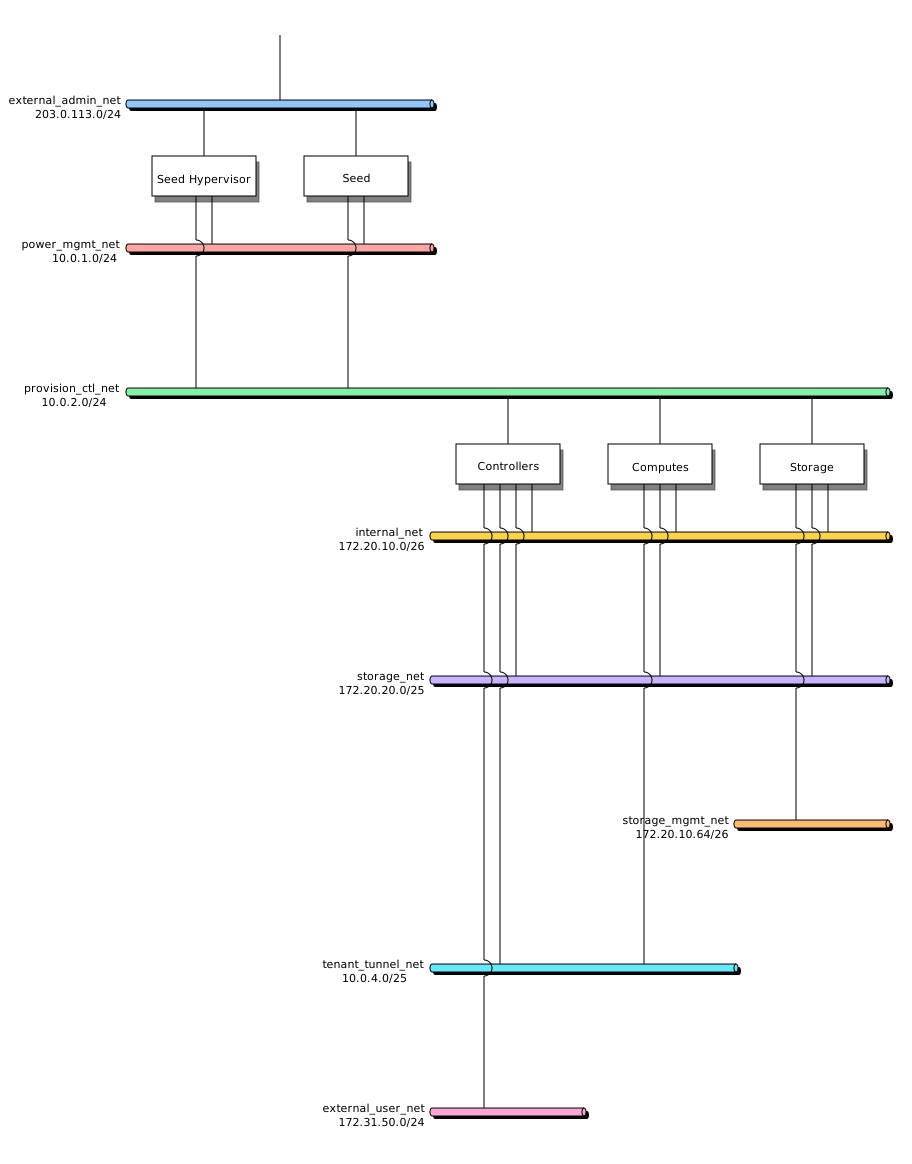
Network assignment to host groups
Note
It is important to use non-routable (RFC 1918 private) address ranges for the power management and provisioning/control networks. This prevents accidental exposure of the infrastructure management and provisioning interfaces to external networks, limiting access to authorized internal networks only.
Network |
VLAN |
Group |
|---|---|---|
external_admin_net |
2270 |
Admin/management (sky blue) |
power_mgmt_net |
2802 |
Power management (rose) |
provision_ctl_net |
3 |
Provision/control (green) |
internal_net |
4 |
Internal API (amber) |
storage_net |
5 |
Storage (violet) |
storage_mgmt_net |
6 |
Storage management (orange) |
tenant_tunnel_net |
7 |
Tenant tunnel (cyan) |
external_user_net |
2280 |
Public API (pink) |
Define Networks in networks.yml
Kayobe uses well-known logical network role variables (such as
provision_oc_net_name and tunnel_net_name). These can optionally be
customised to give more descriptive names. The mappings are defined in
etc/kayobe/networks.yml.
etc/kayobe/networks.yml¶---
# Kayobe network configuration.
###############################################################################
# Network role to network name mappings.
# Network used by the seed to manage bare metal overcloud hosts via their
# out-of-band management controllers.
oob_oc_net_name: "power_mgmt_net"
# Network used by the seed to provision bare metal overcloud hosts.
provision_oc_net_name: "provision_ctl_net"
# Network used to expose the internal OpenStack API endpoints.
internal_net_name: "internal_net"
# Network used to expose the public OpenStack API endpoints.
public_net_name: "external_user_net"
# Network used by Neutron to carry tenant overlay network traffic.
tunnel_net_name: "tenant_tunnel_net"
With the names established, populate the CIDRs, VLAN IDs, MTU values, and
allocation pools for each named network in etc/kayobe/environments/production/networks.yml:
etc/kayobe/environments/production/networks.yml¶---
# Kayobe network configuration.
###############################################################################
# Network definitions.
hs_bond_mtu: 9150
# Power/Management network IP information.
power_mgmt_net_cidr: "10.0.1.0/24"
power_mgmt_net_allocation_pool_start: "10.0.1.10"
power_mgmt_net_allocation_pool_end: "10.0.1.250"
power_mgmt_net_vlan: 2802
power_mgmt_net_mtu: 1500
# Provisioning/Control network IP information.
provision_ctl_net_cidr: "10.0.2.0/24"
provision_ctl_net_allocation_pool_start: "10.0.2.10"
provision_ctl_net_allocation_pool_end: "10.0.2.127"
provision_ctl_net_inspection_allocation_pool_start: "10.0.2.128"
provision_ctl_net_inspection_allocation_pool_end: "10.0.2.250"
provision_ctl_net_switch_vlan: 3
provision_ctl_net_mtu: 1500
# Internal API network IP information.
internal_net_vip_address: "172.20.10.2"
internal_net_cidr: "172.20.10.0/26"
internal_net_allocation_pool_start: "172.20.10.7"
internal_net_allocation_pool_end: "172.20.10.62"
internal_net_vlan: 4
internal_net_mtu: 9000
# Storage network IP information.
storage_net_cidr: "172.20.20.0/25"
storage_net_allocation_pool_start: "172.20.20.10"
storage_net_allocation_pool_end: "172.20.20.126"
storage_net_vlan: 5
storage_net_mtu: "{{ hs_bond_mtu }}"
# Storage Management network IP information.
storage_mgmt_net_cidr: "172.20.10.64/26"
storage_mgmt_net_allocation_pool_start: "172.20.10.74"
storage_mgmt_net_allocation_pool_end: "172.20.10.124"
storage_mgmt_net_vlan: 6
storage_mgmt_net_mtu: 9000
# Tenant/Tunnel network IP information.
tenant_tunnel_net_cidr: "10.0.4.0/25"
tenant_tunnel_net_allocation_pool_start: "10.0.4.10"
tenant_tunnel_net_allocation_pool_end: "10.0.4.127"
tenant_tunnel_net_vlan: 7
tenant_tunnel_net_mtu: "{{ hs_bond_mtu }}"
# External/Admin network IP information.
# This network is used for management access.
external_admin_net_cidr: "203.0.113.0/24"
external_admin_net_allocation_pool_start: "203.0.113.5"
external_admin_net_allocation_pool_end: "203.0.113.9"
external_admin_net_vlan: 2270
external_admin_net_mtu: 1500
external_admin_net_gateway: "203.0.113.250"
# External User network
external_user_net_cidr: "172.31.50.0/24"
external_user_net_vip_address: "172.31.50.4"
external_user_net_gateway: "172.31.50.250"
external_user_net_allocation_pool_start: "172.31.50.10"
external_user_net_allocation_pool_end: "172.31.50.249"
external_user_net_vlan: 2280
external_user_net_mtu: 1500
# FQDN address for public API endpoints, registered with the external DNS
# server to resolve to the public VIP address.
external_user_net_fqdn: "api.example.org"
###############################################################################
# Dummy variable to allow Ansible to accept this file.
workaround_ansible_issue_8743: yes
Common Configuration
Shared overcloud interface mappings should be defined in
inventory/group_vars/overcloud/network-interfaces.
This common configuration is inherited by
all hosts in the overcloud group, including controllers, storage, and compute.
The aim is to avoid repetition of common configuration. You can still override values for specific host groups where required.
inventory/group_vars/overcloud/network-interfaces¶---
# High speed bond config
hs_bond_interface: "bond0"
hs_bond_bond_mode: "802.3ad"
hs_bond_bond_xmit_hash_policy: "layer3+4"
hs_bond_physical_network: "physnet2"
# 25G Control bond config
control_25g_interface: "bond1"
control_25g_bond_mode: "802.3ad"
control_25g_bond_xmit_hash_policy: "layer3+4"
control_25g_physical_network: "physnet3"
# Provision / Control maps to a bridge on the 25G bond port
provision_ctl_net_interface: "br{{ control_25g_interface }}"
provision_ctl_net_bridge_ports:
- "{{ control_25g_interface }}"
provision_ctl_net_physical_network: "physnet3"
# List of names of networks used to provide external network access via Neutron.
# This value is overridden for controllers to add the external_10g network.
external_net_names:
- "hs_bond"
- "provision_ctl_net"
Seed Hypervisor
Warning
Network reconfiguration can potentially break networking and render hosts inaccessible. This is particularly risky when moving the admin interface onto a bridge or bond. It is recommended that you:
Add a password to a local user account that can be accessed via the BMC (either web UI or serial console) to recover should configuration fail. This password should be removed after successful initial deployment.
Configure one host per group initially before applying the configuration across the entire group. If a host becomes misconfigured, it can simply be reprovisioned.
![digraph seed_hypervisor_interfaces {
rankdir=LR;
nodesep=0.35;
ranksep=0.6;
fontname="Helvetica";
node [shape=box, style="rounded,filled", color="#334155", fillcolor="#f8fafc", fontname="Helvetica", fontsize=10];
edge [color="#475569", arrowsize=0.7, penwidth=1.1];
sh_m1 [label="enp65s0f0np0", fillcolor="#e2e8f0"];
sh_m2 [label="enp65s0f1np1", fillcolor="#e2e8f0"];
sh_m3 [label="enp2s0f0np0", fillcolor="#e2e8f0"];
sh_m4 [label="enp2s0f1np1", fillcolor="#e2e8f0"];
sh_b0 [label="bond0", fillcolor="#dbeafe", color="#1d4ed8"];
sh_b1 [label="bond1", fillcolor="#dbeafe", color="#1d4ed8"];
sh_v_admin [label="bond0.2270", fillcolor="#fef3c7", color="#b45309"];
sh_v_power [label="bond0.2802", fillcolor="#fef3c7", color="#b45309"];
sh_br_admin [label="brbond0_admin", fillcolor="#dcfce7", color="#15803d"];
sh_br_power [label="brbond0_power", fillcolor="#dcfce7", color="#15803d"];
sh_br_ctl [label="brbond1", fillcolor="#dcfce7", color="#15803d"];
sh_n_admin [label="external_admin_net", fillcolor="#fee2e2", color="#b91c1c"];
sh_n_power [label="power_mgmt_net", fillcolor="#fee2e2", color="#b91c1c"];
sh_n_ctl [label="provision_ctl_net", fillcolor="#fee2e2", color="#b91c1c"];
sh_n_admin -> sh_br_admin -> sh_v_admin -> sh_b0;
sh_n_power -> sh_br_power -> sh_v_power -> sh_b0;
sh_n_ctl -> sh_br_ctl -> sh_b1;
sh_b0 -> sh_m1;
sh_b0 -> sh_m2;
sh_b1 -> sh_m3;
sh_b1 -> sh_m4;
}](../../_images/graphviz-b37fbbca51481066e13cb038c479737c10586e07.png)
Seed hypervisor interface layering
Note
Any network interface that the seed VM needs to be connected to must be backed by a Linux bridge on the hypervisor. Kayobe provisions the seed using libvirt, which attaches virtual machine interfaces to host networks via bridges — a plain bond or VLAN sub-interface cannot be used directly.
In etc/kayobe/seed-hypervisor.yml define extra networks that are not
mapped to this host by default:
seed_hypervisor_extra_network_interfaces:
  - mgmt_bond_ext
  - mgmt_vlan_admin
  - mgmt_vlan_power
  - mgmt_bond_int
  - external_admin_net
  - power_mgmt_net
In inventory/group_vars/seed-hypervisor/network-interfaces define the
network interface mappings and properties.
To see which interface variables require definitions, run
kayobe configuration dump --var-name network_interfaces --limit seed-hypervisor.
Before creating this file, also run ip a on the seed
hypervisor and use the reported physical interface names in
*_bond_slaves variables.
mgmt_bond_ext_interface: bond0
mgmt_bond_ext_bond_mode: 802.3ad
mgmt_bond_ext_bond_xmit_hash_policy: layer3+4
mgmt_bond_ext_bond_slaves:
  - enp65s0f0np0
  - enp65s0f1np1

mgmt_vlan_admin_interface: "{{ mgmt_bond_ext_interface }}.{{ external_admin_net_vlan }}"
external_admin_net_interface: "br{{ mgmt_bond_ext_interface }}_admin"
external_admin_net_bridge_ports:
  - "{{ mgmt_vlan_admin_interface }}"

mgmt_vlan_power_interface: "{{ mgmt_bond_ext_interface }}.{{ power_mgmt_net_vlan }}"
power_mgmt_net_interface: "br{{ mgmt_bond_ext_interface }}_power"
power_mgmt_net_bridge_ports:
  - "{{ mgmt_vlan_power_interface }}"

mgmt_bond_int_interface: bond1
mgmt_bond_int_bond_mode: 802.3ad
mgmt_bond_int_bond_xmit_hash_policy: layer3+4
mgmt_bond_int_bond_slaves:
  - enp2s0f0np0
  - enp2s0f1np1

provision_ctl_net_interface: "br{{ mgmt_bond_int_interface }}"
provision_ctl_net_bridge_ports:
  - "{{ mgmt_bond_int_interface }}"
Seed
Warning
Network reconfiguration can potentially break networking and render hosts inaccessible. This is particularly risky when moving the admin interface onto a bridge or bond. It is recommended that you:
Add a password to a local user account that can be accessed via the BMC (either web UI or serial console) to recover should configuration fail. This password should be removed after successful initial deployment.
Configure one host per group initially before applying the configuration across the entire group. If a host becomes misconfigured, it can simply be reprovisioned.
Note
The seed’s network interfaces must be defined before running
kayobe seed host provision. Provisioning creates the seed VM and
attaches it to the bridges defined on the hypervisor, so the interface
configuration must be in place for Kayobe to know which networks to connect.
The interface order on the seed VM is derived from
seed_hypervisor_libvirt_networks. To inspect the resolved value, run:
kayobe configuration dump --var-name seed_hypervisor_libvirt_networks --limit seed-hypervisor
The seed is configured to use a separate network card for each logical network.
![digraph seed_host_interfaces {
rankdir=LR;
nodesep=0.6;
ranksep=0.7;
fontname="Helvetica";
node [shape=box, style="rounded,filled", color="#334155", fillcolor="#f8fafc", fontname="Helvetica", fontsize=10];
edge [color="#475569", arrowsize=0.7, penwidth=1.1];
s_if2 [label="ens2", fillcolor="#e2e8f0"];
s_if3 [label="ens3", fillcolor="#e2e8f0"];
s_if4 [label="ens4", fillcolor="#e2e8f0"];
s_n_admin [label="external_admin_net", fillcolor="#fee2e2", color="#b91c1c"];
s_n_ctl [label="provision_ctl_net", fillcolor="#fee2e2", color="#b91c1c"];
s_n_power [label="power_mgmt_net", fillcolor="#fee2e2", color="#b91c1c"];
s_n_admin -> s_if2;
s_n_ctl -> s_if3;
s_n_power -> s_if4;
}](../../_images/graphviz-cdf5492487cbc6cb88a78d41446faf7b84fc6d99.png)
Seed host interface mapping
In etc/kayobe/seed.yml define extra networks that are not mapped to this
host by default:
seed_extra_network_interfaces:
  - external_admin_net
In inventory/group_vars/seed/network-interfaces map networks directly to
host interfaces.
To see which interface variables require definitions, run
kayobe configuration dump --var-name network_interfaces --limit seed
external_admin_net_interface: ens2
provision_ctl_net_interface: ens3
power_mgmt_net_interface: ens4
Controllers
Warning
Network reconfiguration can potentially break networking and render hosts inaccessible. This is particularly risky when moving the admin interface onto a bridge or bond. It is recommended that you:
Add a password to a local user account that can be accessed via the BMC (either web UI or serial console) to recover should configuration fail. This password should be removed after successful initial deployment.
Configure one host per group initially before applying the configuration across the entire group. If a host becomes misconfigured, it can simply be reprovisioned.
The diagram below shows the network interface configuration for the controllers:
Controllers use a combination of bond aggregation and Linux bridges.
![digraph controller_interfaces {
rankdir=LR;
nodesep=0.35;
ranksep=0.6;
fontname="Helvetica";
node [shape=box, style="rounded,filled", color="#334155", fillcolor="#f8fafc", fontname="Helvetica", fontsize=10];
edge [color="#475569", arrowsize=0.7, penwidth=1.1];
c_m1 [label="eno33np0", fillcolor="#e2e8f0"];
c_m2 [label="eno34np1", fillcolor="#e2e8f0"];
c_m3 [label="ens3f0np0", fillcolor="#e2e8f0"];
c_m4 [label="ens3f1np1", fillcolor="#e2e8f0"];
c_m5 [label="eno35np2", fillcolor="#e2e8f0"];
c_m6 [label="eno36np3", fillcolor="#e2e8f0"];
c_b1 [label="bond1", fillcolor="#dbeafe", color="#1d4ed8"];
c_b0 [label="bond0", fillcolor="#dbeafe", color="#1d4ed8"];
c_b2 [label="bond2", fillcolor="#dbeafe", color="#1d4ed8"];
c_v_int [label="bond0.4", fillcolor="#fef3c7", color="#b45309"];
c_v_sto [label="bond0.5", fillcolor="#fef3c7", color="#b45309"];
c_v_tun [label="bond0.7", fillcolor="#fef3c7", color="#b45309"];
c_v_ext [label="brbond2.2280", fillcolor="#fef3c7", color="#b45309"];
c_br_ctl [label="brbond1", fillcolor="#dcfce7", color="#15803d"];
c_br_ext [label="brbond2", fillcolor="#dcfce7", color="#15803d"];
c_n_ctl [label="provision_ctl_net", fillcolor="#fee2e2", color="#b91c1c"];
c_n_int [label="internal_net", fillcolor="#fee2e2", color="#b91c1c"];
c_n_sto [label="storage_net", fillcolor="#fee2e2", color="#b91c1c"];
c_n_tun [label="tenant_tunnel_net", fillcolor="#fee2e2", color="#b91c1c"];
c_n_ext [label="external_user_net", fillcolor="#fee2e2", color="#b91c1c"];
c_n_ctl -> c_br_ctl -> c_b1;
c_n_int -> c_v_int -> c_b0;
c_n_sto -> c_v_sto -> c_b0;
c_n_tun -> c_v_tun -> c_b0;
c_n_ext -> c_v_ext -> c_br_ext -> c_b2;
c_b1 -> c_m1;
c_b1 -> c_m2;
c_b0 -> c_m3;
c_b0 -> c_m4;
c_b2 -> c_m5;
c_b2 -> c_m6;
}](../../_images/graphviz-18c26d5f180152157a1d7b47b50b758b4cc7c801.png)
Controller interface layering
Controllers integrate the physical bond interfaces with OpenStack Neutron to provide tenant network connectivity.
![digraph neutron_wiring_controllers {
rankdir=LR;
nodesep=0.35;
ranksep=0.7;
fontname="Helvetica";
node [shape=box, style="rounded,filled", color="#334155", fillcolor="#f8fafc", fontname="Helvetica", fontsize=10];
edge [color="#475569", arrowsize=0.7, penwidth=1.1];
{ rank=same; c_net_ext; c_net_hs; c_net_ctl; }
c_net_ext [label="external_bridge\nphysnet1\n(network maps to Linux bridge)", fillcolor="#fee2e2", color="#b91c1c"];
c_net_hs [label="hs_bond\nphysnet2\n(network maps directly)", fillcolor="#fee2e2", color="#b91c1c"];
c_net_ctl [label="provision_ctl_net\nphysnet3\n(network maps to Linux bridge)", fillcolor="#fee2e2", color="#b91c1c"];
c_lx_ext [label="Linux bridge\nbrbond2", fillcolor="#dcfce7", color="#15803d"];
c_lx_ctl [label="Linux bridge\nbrbond1", fillcolor="#dcfce7", color="#15803d"];
c_bond0 [label="bond0", fillcolor="#fef3c7", color="#b45309"];
c_ovs_ext [label="OVS bridge\nbrbond2-ovs", fillcolor="#dbeafe", color="#1d4ed8"];
c_ovs_hs [label="OVS bridge\nbond0-ovs", fillcolor="#dbeafe", color="#1d4ed8"];
c_ovs_ctl [label="OVS bridge\nbrbond1-ovs", fillcolor="#dbeafe", color="#1d4ed8"];
c_neutron [label="Neutron\nprovider networks", fillcolor="#e0f2fe", color="#0284c7"];
subgraph cluster_c_pp_brbond2 {
label="patch link";
style="dashed";
color="#6d28d9";
fillcolor="#faf5ff";
c_pp_brbond2_phy [label="p-brbond2-phy", fillcolor="#ede9fe", color="#6d28d9"];
c_pp_brbond2_ovs [label="p-brbond2-ovs", fillcolor="#ede9fe", color="#6d28d9"];
}
subgraph cluster_c_pp_brbond1 {
label="patch link";
style="dashed";
color="#6d28d9";
fillcolor="#faf5ff";
c_pp_brbond1_phy [label="p-brbond1-phy", fillcolor="#ede9fe", color="#6d28d9"];
c_pp_brbond1_ovs [label="p-brbond1-ovs", fillcolor="#ede9fe", color="#6d28d9"];
}
c_net_ext -> c_lx_ext;
c_lx_ext -> c_pp_brbond2_phy;
c_pp_brbond2_ovs -> c_ovs_ext;
c_net_ctl -> c_lx_ctl;
c_lx_ctl -> c_pp_brbond1_phy;
c_pp_brbond1_ovs -> c_ovs_ctl;
c_net_hs -> c_bond0;
c_bond0 -> c_ovs_hs [label="direct interface"];
c_ovs_ext -> c_neutron;
c_ovs_hs -> c_neutron;
c_ovs_ctl -> c_neutron;
}](../../_images/graphviz-4e28f8c3ac13993bd48c2e018812cdd27eb1e8a8.png)
Wiring networks into Neutron (controllers)
This diagram shows how host networks are wired into Neutron through Open vSwitch bridges. When a network maps to a Linux bridge, that bridge connects to OVS via a patch link. When a network does not map to a Linux bridge, it is connected directly into the OVS bridge. Where possible, operators should prefer wiring a bond directly into OVS, since this can enable hardware offloading. Linux bridges are required when a service running on the host must attach directly to that network.
Controllers usually combine bridge-on-bond for external/API traffic with VLAN subinterfaces for API and tunnel networks.
In etc/kayobe/controllers.yml ensure the host network list includes the
expected external and control networks:
controller_network_interfaces: "{{ storage_network_interfaces + controller_extra_network_interfaces }}"

controller_extra_network_interfaces:
  - external_10g
  - external_bridge
  - control_25g
  - external_user_net
  - tenant_tunnel_net
In inventory/group_vars/controllers/network-interfaces define the bond and
bridge pattern.
To see which interface variables require definitions, run
kayobe configuration dump --var-name network_interfaces --limit controllers[0]. Before creating this file, also run ip a on
controller hosts and capture the physical NIC names used in bond slave lists.
external_net_names:
  - external_bridge
  - hs_bond
  - provision_ctl_net

external_10g_interface: bond2
external_10g_bond_mode: 802.3ad
external_10g_bond_xmit_hash_policy: layer3+4
external_10g_bond_slaves:
  - eno35np2
  - eno36np3

 control_25g_bond_slaves:
   - eno33np0
   - eno34np1

 hs_bond_bond_slaves:
   - ens3f0np0
   - ens3f1np1

external_bridge_interface: "br{{ external_10g_interface }}"
external_bridge_bridge_ports:
  - "{{ external_10g_interface }}"

external_user_net_interface: "{{ external_bridge_interface }}.{{ external_user_net_vlan }}"
tenant_tunnel_net_interface: "{{ hs_bond_interface }}.{{ tenant_tunnel_net_vlan }}"
Compute
Warning
Network reconfiguration can potentially break networking and render hosts inaccessible. This is particularly risky when moving the admin interface onto a bridge or bond. It is recommended that you:
Add a password to a local user account that can be accessed via the BMC (either web UI or serial console) to recover should configuration fail. This password should be removed after successful initial deployment.
Configure one host per group initially before applying the configuration across the entire group. If a host becomes misconfigured, it can simply be reprovisioned.
The diagram below shows the network interface configuration for the compute nodes:
Compute hosts use a high-speed bond for internal OpenStack networks and a separate bond for management connectivity.
![digraph compute_interfaces {
rankdir=LR;
nodesep=0.35;
ranksep=0.6;
fontname="Helvetica";
node [shape=box, style="rounded,filled", color="#334155", fillcolor="#f8fafc", fontname="Helvetica", fontsize=10];
edge [color="#475569", arrowsize=0.7, penwidth=1.1];
k_m1 [label="eno12399np0", fillcolor="#e2e8f0"];
k_m2 [label="eno12409np1", fillcolor="#e2e8f0"];
k_m3 [label="ens3f0np0", fillcolor="#e2e8f0"];
k_m4 [label="ens3f1np1", fillcolor="#e2e8f0"];
k_b1 [label="bond1", fillcolor="#dbeafe", color="#1d4ed8"];
k_b0 [label="bond0", fillcolor="#dbeafe", color="#1d4ed8"];
k_v_int [label="bond0.4", fillcolor="#fef3c7", color="#b45309"];
k_v_sto [label="bond0.5", fillcolor="#fef3c7", color="#b45309"];
k_v_tun [label="bond0.7", fillcolor="#fef3c7", color="#b45309"];
k_br_ctl [label="brbond1", fillcolor="#dcfce7", color="#15803d"];
k_n_ctl [label="provision_ctl_net", fillcolor="#fee2e2", color="#b91c1c"];
k_n_int [label="internal_net", fillcolor="#fee2e2", color="#b91c1c"];
k_n_sto [label="storage_net", fillcolor="#fee2e2", color="#b91c1c"];
k_n_tun [label="tenant_tunnel_net", fillcolor="#fee2e2", color="#b91c1c"];
k_n_ctl -> k_br_ctl -> k_b1;
k_n_int -> k_v_int -> k_b0;
k_n_sto -> k_v_sto -> k_b0;
k_n_tun -> k_v_tun -> k_b0;
k_b1 -> k_m1;
k_b1 -> k_m2;
k_b0 -> k_m3;
k_b0 -> k_m4;
}](../../_images/graphviz-5ae47e50bd4cfda4ecb7c9429f3d3e90339bdce5.png)
Compute interface layering
Compute hosts also integrate with Neutron through Open vSwitch bridges, using a similar bridge-on-bond model for control network traffic.
![digraph neutron_wiring_compute {
rankdir=LR;
nodesep=0.35;
ranksep=0.7;
fontname="Helvetica";
node [shape=box, style="rounded,filled", color="#334155", fillcolor="#f8fafc", fontname="Helvetica", fontsize=10];
edge [color="#475569", arrowsize=0.7, penwidth=1.1];
{ rank=same; k_net_hs; k_net_ctl; }
k_net_hs [label="hs_bond\nphysnet2\n(network maps directly)", fillcolor="#fee2e2", color="#b91c1c"];
k_net_ctl [label="provision_ctl_net\nphysnet3\n(network maps to Linux bridge)", fillcolor="#fee2e2", color="#b91c1c"];
k_lx_ctl [label="Linux bridge\nbrbond1", fillcolor="#dcfce7", color="#15803d"];
k_bond0 [label="bond0", fillcolor="#fef3c7", color="#b45309"];
k_ovs_hs [label="OVS bridge\nbond0-ovs", fillcolor="#dbeafe", color="#1d4ed8"];
k_ovs_ctl [label="OVS bridge\nbrbond1-ovs", fillcolor="#dbeafe", color="#1d4ed8"];
k_neutron [label="Neutron\nprovider networks", fillcolor="#e0f2fe", color="#0284c7"];
subgraph cluster_k_pp_brbond1 {
label="patch link";
style="dashed";
color="#6d28d9";
fillcolor="#faf5ff";
k_pp_brbond1_phy [label="p-brbond1-phy", fillcolor="#ede9fe", color="#6d28d9"];
k_pp_brbond1_ovs [label="p-brbond1-ovs", fillcolor="#ede9fe", color="#6d28d9"];
}
k_net_ctl -> k_lx_ctl;
k_lx_ctl -> k_pp_brbond1_phy;
k_pp_brbond1_ovs -> k_ovs_ctl;
k_net_hs -> k_bond0;
k_bond0 -> k_ovs_hs [label="direct interface"];
k_ovs_hs -> k_neutron;
k_ovs_ctl -> k_neutron;
}](../../_images/graphviz-74b23b2ca091b77b74d68a5d3c4563fc7d9568eb.png)
Wiring networks into Neutron (compute)
Note
Operators should prefer directly connecting interfaces into Open vSwitch bridges to allow for hardware offloading.
Compute hosts in this configuration use a high-speed bond and a separate control bond, with internal, storage, and tunnel VLANs carried on the high-speed bond.
In etc/kayobe/compute.yml include the required network list:
compute_extra_network_interfaces:
  - provision_ctl_net
  - control_25g
  - hs_bond
In inventory/group_vars/compute/network-interfaces define bond members and
VLAN subinterfaces.
To see which interface variables require definitions, run
kayobe configuration dump --var-name network_interfaces --limit compute[0].
Before creating this file, also run ip a on compute hosts
and use the detected physical interface names for bond members.
control_25g_bond_slaves:
  - eno12399np0
  - eno12409np1

hs_bond_bond_slaves:
  - ens3f0np0
  - ens3f1np1

internal_net_interface: "{{ hs_bond_interface }}.{{ internal_net_vlan }}"
storage_net_interface: "{{ hs_bond_interface }}.{{ storage_net_vlan }}"
tenant_tunnel_net_interface: "{{ hs_bond_interface }}.{{ tenant_tunnel_net_vlan }}"
Storage
Warning
Network reconfiguration can potentially break networking and render hosts inaccessible. This is particularly risky when moving the admin interface onto a bridge or bond. It is recommended that you:
Add a password to a local user account that can be accessed via the BMC (either web UI or serial console) to recover should configuration fail. This password should be removed after successful initial deployment.
Configure one host per group initially before applying the configuration across the entire group. If a host becomes misconfigured, it can simply be reprovisioned.
Storage hosts follow the same control-bond plus high-speed-bond model as compute hosts, with additional networks for storage and storage management.
![digraph storage_interfaces {
rankdir=LR;
nodesep=0.35;
ranksep=0.6;
fontname="Helvetica";
node [shape=box, style="rounded,filled", color="#334155", fillcolor="#f8fafc", fontname="Helvetica", fontsize=10];
edge [color="#475569", arrowsize=0.7, penwidth=1.1];
s_m1 [label="eno33np0", fillcolor="#e2e8f0"];
s_m2 [label="eno34np1", fillcolor="#e2e8f0"];
s_m3 [label="ens2f0np0", fillcolor="#e2e8f0"];
s_m4 [label="ens2f1np1", fillcolor="#e2e8f0"];
s_b1 [label="bond1", fillcolor="#dbeafe", color="#1d4ed8"];
s_b0 [label="bond0", fillcolor="#dbeafe", color="#1d4ed8"];
s_v_int [label="bond0.4", fillcolor="#fef3c7", color="#b45309"];
s_v_sto [label="bond0.5", fillcolor="#fef3c7", color="#b45309"];
s_v_sto_mgmt [label="bond0.6", fillcolor="#fef3c7", color="#b45309"];
s_br_ctl [label="brbond1", fillcolor="#dcfce7", color="#15803d"];
s_n_ctl [label="provision_ctl_net", fillcolor="#fee2e2", color="#b91c1c"];
s_n_int [label="internal_net", fillcolor="#fee2e2", color="#b91c1c"];
s_n_sto [label="storage_net", fillcolor="#fee2e2", color="#b91c1c"];
s_n_sto_mgmt [label="storage_mgmt_net", fillcolor="#fee2e2", color="#b91c1c"];
s_n_ctl -> s_br_ctl -> s_b1;
s_n_int -> s_v_int -> s_b0;
s_n_sto -> s_v_sto -> s_b0;
s_n_sto_mgmt -> s_v_sto_mgmt -> s_b0;
s_b1 -> s_m1;
s_b1 -> s_m2;
s_b0 -> s_m3;
s_b0 -> s_m4;
}](../../_images/graphviz-c0fda8d9bbad2fdeb66c93b00f24c75590da2eed.png)
Storage interface layering
Storage hosts in this configuration follow the same control-bond plus high-speed-bond model, with storage and storage management networks carried as VLAN subinterfaces on the high-speed bond.
In etc/kayobe/storage.yml include the required network list:
storage_extra_network_interfaces:
  - provision_ctl_net
  - control_25g
  - hs_bond
  - storage_mgmt_net
In inventory/group_vars/storage/network-interfaces define bond members and
network VLAN mappings.
To see which interface variables require definitions, run
kayobe configuration dump --var-name network_interfaces --limit storage[0] against the
storage group. Before creating this file, also run ip a on storage hosts
and use the detected physical interface names for bond members.
control_25g_bond_slaves:
  - eno33np0
  - eno34np1

hs_bond_bond_slaves:
  - ens2f0np0
  - ens2f1np1

internal_net_interface: "{{ hs_bond_interface }}.{{ internal_net_vlan }}"
storage_net_interface: "{{ hs_bond_interface }}.{{ storage_net_vlan }}"
storage_mgmt_net_interface: "{{ hs_bond_interface }}.{{ storage_mgmt_net_vlan }}"
Validation
After applying the configuration, verify network connectivity across all host groups:
kayobe network connectivity check
