Step 2. Rally input task format
Basic input task syntax
Rally comes with a really great collection of plugins and in most real-world cases you will use multiple plugins to test your OpenStack cloud. Rally makes it very easy to run different test cases defined in a single task.
Current format (v2): Rally currently uses task format version 2, which provides better organization, metadata support, and flexibility:
{
    "version": 2,
    "title": "Task title",
    "description": "Task description",
    "tags": ["tag1", "tag2"],
    "subtasks": [
        {
            "title": "Subtask title",
            "scenario": {
                "ScenarioName": { <scenario-specific arguments> }
            },
            "runner": {
                "runner_type": { <runner parameters> }
            },
            "contexts": { <contexts needed for this scenario> },
            "sla": { <different SLA configs> }
        }
    ]
}
Note
An older task format (v1) also exists and is deprecated. Rally still accepts it and automatically converts it to v2 internally for compatibility, but new tasks should always use the v2 format shown above. The v1 format is not documented here on purpose, so that new tasks are not written against it.
Multiple subtasks in a single task
As an example, let's edit our configuration file from step 1 so that it prescribes Rally to launch not only the NovaServers.boot_and_delete_server scenario, but also the KeystoneBasic.create_delete_user scenario.
multiple-scenarios.json
{
    "version": 2,
    "title": "Multiple scenarios example",
    "description": "Example demonstrating multiple scenarios in a single task",
    "tags": ["nova", "keystone", "example"],
    "subtasks": [
        {
            "title": "Nova server lifecycle test",
            "scenario": {
                "NovaServers.boot_and_delete_server": {
                    "flavor": {
                        "name": "m1.tiny"
                    },
                    "image": {
                        "name": "^cirros.*-disk$"
                    },
                    "force_delete": false
                }
            },
            "runner": {
                "constant": {
                    "times": 10,
                    "concurrency": 2
                }
            },
            "contexts": {
                "users": {
                    "tenants": 3,
                    "users_per_tenant": 2
                }
            }
        },
        {
            "title": "Keystone user management test",
            "scenario": {
                "KeystoneBasic.create_delete_user": {}
            },
            "runner": {
                "constant": {
                    "times": 10,
                    "concurrency": 3
                }
            }
        }
    ]
}
Now you can start this task as usual:
$ rally task start multiple-scenarios.json
...
+--------------------+-----------+-----------+-----------+---------------+---------------+---------+-------+
| action             | min (sec) | avg (sec) | max (sec) | 90 percentile | 95 percentile | success | count |
+--------------------+-----------+-----------+-----------+---------------+---------------+---------+-------+
| nova.boot_server   | 8.06      | 11.354    | 18.594    | 18.54         | 18.567        | 100.0%  | 10    |
| nova.delete_server | 4.364     | 5.054     | 6.837     | 6.805         | 6.821         | 100.0%  | 10    |
| total              | 12.572    | 16.408    | 25.396    | 25.374        | 25.385        | 100.0%  | 10    |
+--------------------+-----------+-----------+-----------+---------------+---------------+---------+-------+
Load duration: 84.1959171295
Full duration: 102.033041
--------------------------------------------------------------------------------

...

+----------------------+-----------+-----------+-----------+---------------+---------------+---------+-------+
| action               | min (sec) | avg (sec) | max (sec) | 90 percentile | 95 percentile | success | count |
+----------------------+-----------+-----------+-----------+---------------+---------------+---------+-------+
| keystone.create_user | 0.676     | 0.875     | 1.03      | 1.02          | 1.025         | 100.0%  | 10    |
| keystone.delete_user | 0.407     | 0.647     | 0.84      | 0.739         | 0.79          | 100.0%  | 10    |
| total                | 1.082     | 1.522     | 1.757     | 1.724         | 1.741         | 100.0%  | 10    |
+----------------------+-----------+-----------+-----------+---------------+---------------+---------+-------+
Load duration: 5.72119688988
Full duration: 10.0808410645

...
Note that the HTML task reports can be generated by typing rally task report --out=report_name.html. This command works even if not all subtask are done.
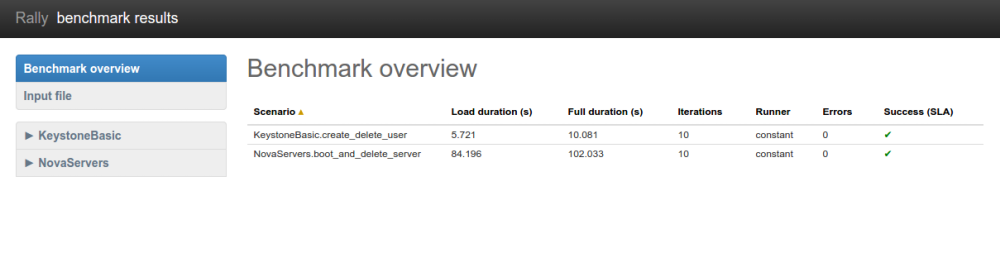
Let's take a look at the report overview page for a task with multiple subtasks
rally task report --out=report_multiple_scenarios.html --open
Multiple configurations of the same scenario
Yet another thing you can do in Rally is to launch the same scenario multiple times with different configurations. In v2 format, this is done by creating multiple subtasks with the same scenario but different parameters. Let's say, you want to run the boot_and_delete_server scenario twice: first using the "m1.tiny" flavor and then using the "m1.small" flavor:
multiple-configurations.json
{
    "version": 2,
    "title": "Multiple configurations example",
    "description": "Running the same scenario with different configurations",
    "tags": ["nova", "flavors", "configurations"],
    "subtasks": [
        {
            "title": "Boot server with m1.tiny flavor",
            "scenario": {
                "NovaServers.boot_and_delete_server": {
                    "flavor": {
                        "name": "m1.tiny"
                    },
                    "image": {
                        "name": "^cirros.*-disk$"
                    },
                    "force_delete": false
                }
            },
            "runner": {
                "constant": {
                    "times": 10,
                    "concurrency": 2
                }
            },
            "contexts": {
                "users": {
                    "tenants": 3,
                    "users_per_tenant": 2
                }
            }
        },
        {
            "title": "Boot server with m1.small flavor",
            "scenario": {
                "NovaServers.boot_and_delete_server": {
                    "flavor": {
                        "name": "m1.small"
                    },
                    "image": {
                        "name": "^cirros.*-disk$"
                    },
                    "force_delete": false
                }
            },
            "runner": {
                "constant": {
                    "times": 10,
                    "concurrency": 2
                }
            },
            "contexts": {
                "users": {
                    "tenants": 3,
                    "users_per_tenant": 2
                }
            }
        }
    ]
}
That's it! You will get again the results for each configuration separately:
$ rally task start --task=multiple-configurations.json
...
+--------------------+-----------+-----------+-----------+---------------+---------------+---------+-------+
| action             | min (sec) | avg (sec) | max (sec) | 90 percentile | 95 percentile | success | count |
+--------------------+-----------+-----------+-----------+---------------+---------------+---------+-------+
| nova.boot_server   | 7.896     | 9.433     | 13.14     | 11.329        | 12.234        | 100.0%  | 10    |
| nova.delete_server | 4.435     | 4.898     | 6.975     | 5.144         | 6.059         | 100.0%  | 10    |
| total              | 12.404    | 14.331    | 17.979    | 16.72         | 17.349        | 100.0%  | 10    |
+--------------------+-----------+-----------+-----------+---------------+---------------+---------+-------+
Load duration: 73.2339417934
Full duration: 91.1692159176
--------------------------------------------------------------------------------

...

+--------------------+-----------+-----------+-----------+---------------+---------------+---------+-------+
| action             | min (sec) | avg (sec) | max (sec) | 90 percentile | 95 percentile | success | count |
+--------------------+-----------+-----------+-----------+---------------+---------------+---------+-------+
| nova.boot_server   | 8.207     | 8.91      | 9.823     | 9.692         | 9.758         | 100.0%  | 10    |
| nova.delete_server | 4.405     | 4.767     | 6.477     | 4.904         | 5.691         | 100.0%  | 10    |
| total              | 12.735    | 13.677    | 16.301    | 14.596        | 15.449        | 100.0%  | 10    |
+--------------------+-----------+-----------+-----------+---------------+---------------+---------+-------+
Load duration: 71.029528141
Full duration: 88.0259010792
...
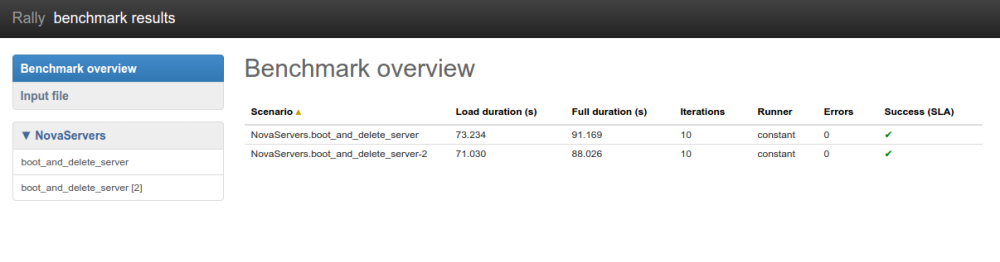
The HTML report will also look similar to what we have seen before:
rally task report --out=report_multiple_configuraions.html --open